Use Case
I need to redact a dark video in my CaseGuard but I can barely see the faces in the video. How do I increase the brightness in CaseGuard?
Follow these steps to increase the brightness of your video!
First open your dark video in CaseGuard, once the video is open select Video Tools -> effects -> Auto Brightness
Then remove the adaptive-blur filter.
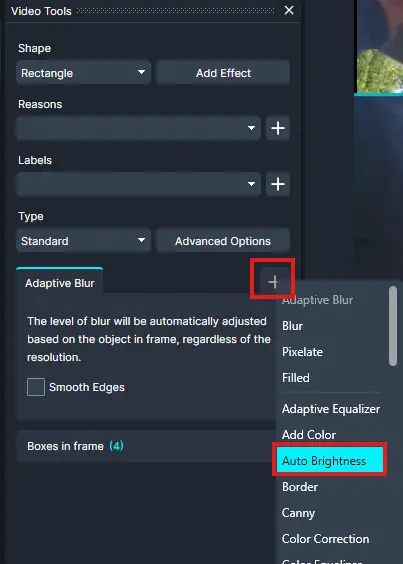
Apply the effect to the whole screen by dragging it against the video.
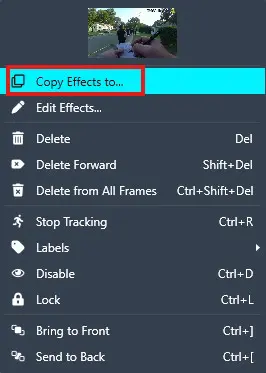
Right click and click on “copy effects to”
Click next, apply to whole file, then click apply.
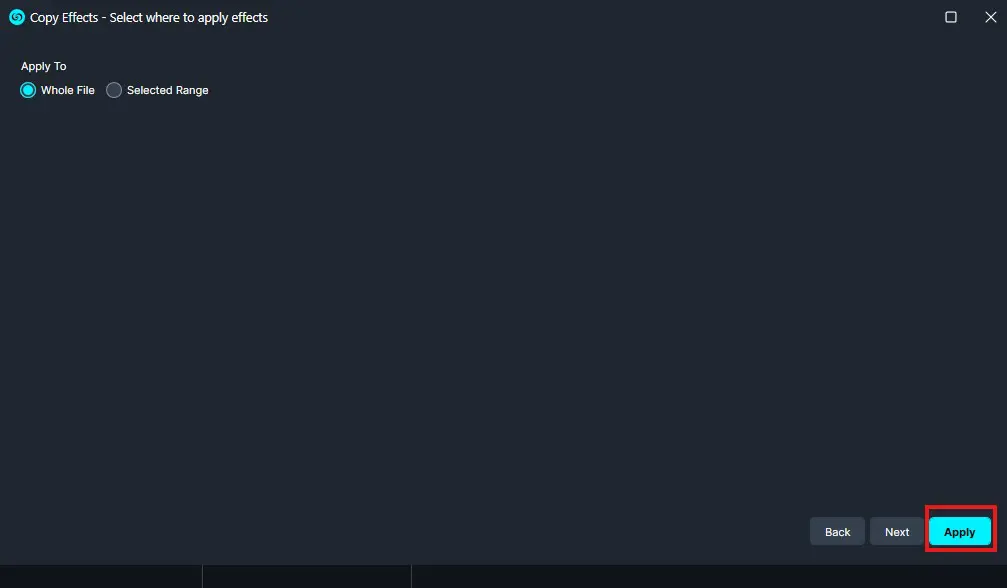
Now the auto brightness effect has been applied to your whole video! However, before we begin redacting, we will need to export. From the top right of CaseGuard select the Export button at the top right of CaseGuard.
- Please follow the steps in this article to export your video.
Once the export finishes, apply your redactions like normal and export the file once you are done redacting.
Conclusion
Adjusting brightness before redacting can improve visibility and improve redaction accuracy.
If you have any questions on how to brighten a dark video, please contact [email protected].
Was this article helpful to you?
No
Yes