Bulk Software Installation with CaseGuard Hub
The Bulk Software Installation feature in CaseGuard Hub allows IT administrators to install, update, or uninstall CaseGuard Studio across multiple devices in a secure and efficient manner. This functionality significantly reduces the time and effort required to manage software deployments across your agency or organization.
Installation Options
After selecting your operation, configure the deployment details:
- Select Installation File:
Click the folder icon to upload the CaseGuard Studio installer.
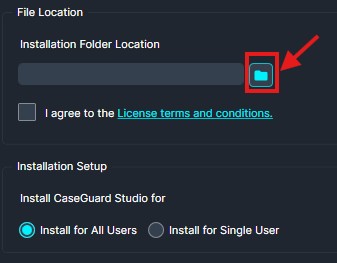
- Now select the CaseGuard Studio exe that you would like to deploy on your computers.
Now that you have selected the exe you will need to configure the options below:
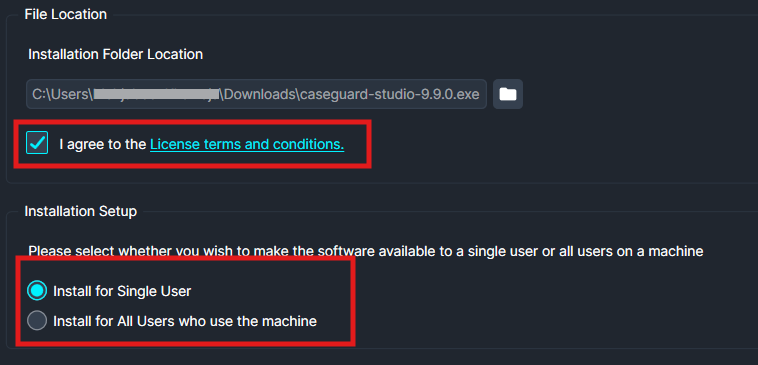
- Agree to the license terms and choose the installation scope:
- Install for all users or Install for a single user.
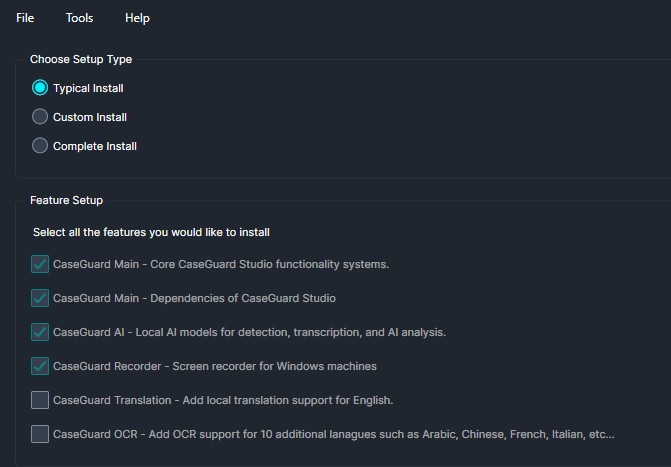
Setup Type:
-
Typical Install
-
Custom Install
-
Complete Install
Select the desired features you’d like to include, then click Create Script (bottom right) to create the script.
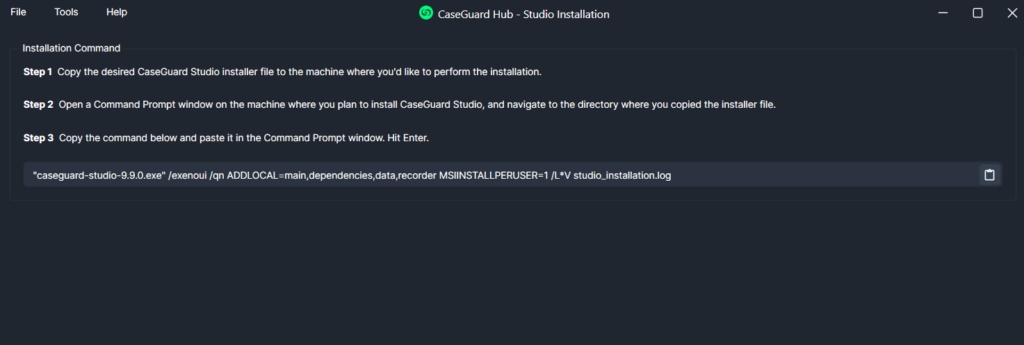
Final Steps
Copy and past the script into the terminal of each computer you would like to install CaseGuard on. After installation, verify with your end users that CaseGuard Studio has been installed successfully. If you have any questions or issues, please reach out to our support team at [email protected]. A representative will be happy to assist you.
Conclusion
The Bulk Software Installation feature in CaseGuard Hub is a vital tool for IT teams that need to efficiently manage CaseGuard Studio across multiple systems. Whether you’re rolling out updates, performing initial deployments, or uninstalling outdated versions, this tool ensures consistent and streamlined results. For questions, troubleshooting, or further guidance, contact our support team at [email protected]—we’re here to help.
Was this article helpful to you?
No
Yes