What are we Considering when Comparing Video Redaction Software?
- The Pain Point: Video redaction requires hiding sensitive personal information to comply with strict privacy laws before files can be shared safely.
- Manual vs. Automated Workflows: Traditional video editing tools require hours of frame-by-frame editing, whereas dedicated video redaction software automates the process to finish the same work in minutes.
- Key Features to Look For: Modern privacy tools combine automatic transcription and translation software, moving-object tracking, bulk processing, and automated compliance logging into a single system.
Adobe Premiere Pro is a massive name in the video editing world. For thirty years, it has helped filmmakers piece together box office hits and creative projects. But there is a huge difference between editing a movie and hiding private details to comply with privacy guidelines.
To see how big this gap is, we can compare Premiere Pro with CaseGuard Studio. One is a classic creative suite, and the other is a dedicated video redaction software built for modern privacy workflows. Let us look at how they perform in the areas that matter most for compliance.

Play Video
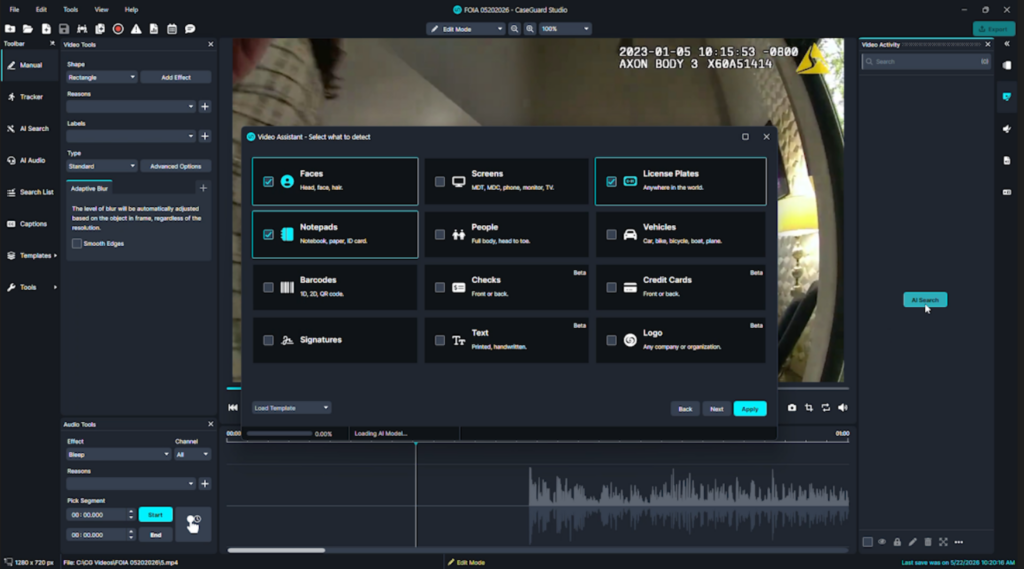 AI video detection and redaction inside CaseGuard
Yes! Gone are the days where you have to spend a full 8 hours on just one video. When video footage contains sensitive data, finding and hiding it quickly is your top priority. Under data privacy regulations, protecting the privacy of individuals is a legal requirement. The two systems handle this task in entirely different ways:
- CaseGuard automatically detects and redacts twelve distinct categories of personal information.
- Users can apply different visual effects to blur the information, or even add labels that explain the legal reason for hiding it.
- The software features a performance setting that lets you switch from optimal speed to a deeper coverage mode for dark or difficult footage.
- A clear six-minute video takes just five minutes to process and redact automatically.
Through artificial intelligence and machine learning, modern video redaction tools can easily pinpoint identifiable information like faces, license plates, and other sensitive elements.
Premiere Pro does not have any tools to search for names, faces, or license plates. Instead, you have to do everything by hand. You must sit at your desk and look at the video content frame by frame. You have to draw a mask over every piece of private data, adjust the path as the target moves, and manually set keyframes for every single change. That same six-minute video can easily take up to four hours of manual editing. If the camera moves quickly or the scene is crowded, you will spend even more time squinting at your screen.
Subscribe to our Newsletter
Tracking Objects in Motion
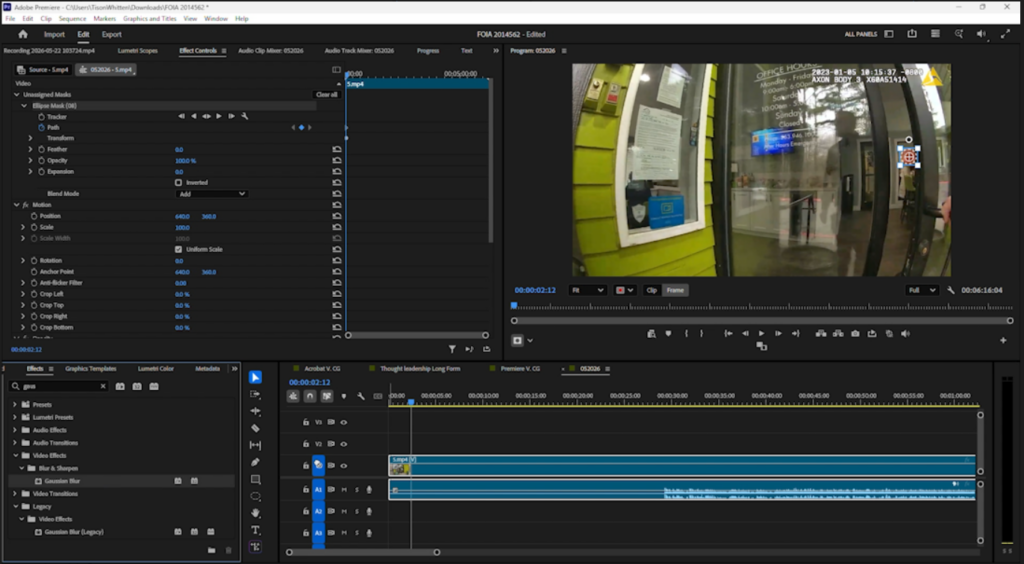 Manual frame by frame redaction inside Premiere Pro
People and vehicles do not stand still in videos, which means your redaction blurs need to move with them. Premiere Pro has a built-in auto-tracker, but it only works well in controlled environments with stable lighting. If your video has shaky camera work, crowded scenes, or poor lighting, the tracker often loses its target. To get the job done right, you have to buy expensive third-party add-ons or send your project to a completely separate application.
CaseGuard Studio uses tracking tools designed specifically to stay locked onto moving targets under tough conditions. You can apply these trackers quickly to elevate the quality of your video redaction and keep private details covered, even when the scene gets chaotic.
Comparing Capabilities as Automatic Transcription and Translation Software
Audio redaction is just as important as video redaction. To hide names or sensitive details in a conversation, you need to know exactly what is being said. Adobe deserves credit for its transcription tools. The system writes down spoken words with great accuracy.
However, the creative workspace is easy to disrupt. If you make a mistake or try to adjust the text in an unusual way, the transcription system can break and freeze your progress.
So, Are there Video Redaction Solutions that Support Multiple Languages?
Yes! CaseGuard Studio approaches transcription with a clear focus on privacy, serving as an effective automatic transcription and translation software:
- The system builds accurate text files and lets you identify different speakers quickly.
- You can silence specific words or sections of audio directly from the transcript.
- Users can change the pitch of a speaker’s voice to preserve their anonymity while keeping their words clear and easy to understand.
Processing Huge Batches of Files
When you have a mountain of video files to process, working on one video at a time is a recipe for burnout. While an editor is still working on a single video file inside Premiere Pro, a specialist can run bulk processing in CaseGuard Studio to handle an unlimited number of files all at once.
You choose the exact settings you want, customize them for your project, and upload your files. You can even schedule the system to run these big jobs overnight or over the weekend. When you return to your desk on Monday morning, the work is already done. Premiere Pro does not offer a built-in way to run these kinds of bulk tasks.
Creating the Paper Trail
The job is not finished when the video is blurred. Most organizations must keep a detailed audit report of every single change they make to a file. This log needs to show exactly when a change happened and why the information was hidden.
In Premiere Pro, this step turns into a second wave of manual labor. To do it right, you have to write down every timestamp where a blur appears, note down why it was hidden, and repeat this process for every single edit. It is a tedious task that might make you want to take a very long walk outside to contemplate life.
CaseGuard Studio handles this paperwork automatically. The system builds your exemption logs using the reasons you selected when you first blurred the video. You can even set the software to automatically apply default reasons to specific categories of personal information. The logs generate themselves while you work, saving you from hours of manual spreadsheet entry.
Meeting Your Legal Obligations
In the digital age, organizations face a growing mountain of compliance work. Law enforcement agencies must redact video evidence and CCTV footage to fulfill public records requests under the Freedom of Information Act while protecting civilian identities. Healthcare providers and insurance teams must carefully scrub health information to stay compliant with HIPAA regulations.
Government agencies are tasked with a crucial role: balancing public trust with privacy protection. This means preventing unauthorized access to confidential information, which is a key part of modern best practices. Whether you are prepping files for legal proceedings or answering a public records request, the redaction process must be completely secure. It is no longer just about editing; it is about meeting strict ethical standards.
Both of these systems are leaders in their respective fields, but they serve entirely different purposes. Premiere Pro is built for Hollywood, storytelling, and high-end video editing. Using it for compliance is a data breach waiting to happen, if it hasn’t yet.
CaseGuard Studio is built specifically for the realities of public records and compliance. It removes the manual pain of protecting sensitive data and gets you away from your desk much faster. If you want to see how it can speed up your daily work, you can visit the CaseGuard website to book a free demo and see how it handles real time redaction today.