Key Takeaways
- This is a redaction-only comparison. JustFOIA is a public records case management system. CaseGuard Studio is a dedicated AI redaction platform. We’re comparing redaction capabilities, not request lifecycle management.
- For clean, digital documents, both tools get the job done. The gap opens with scanned pages, unstructured text, and anything that isn’t a PDF.
- CaseGuard Studio redacts video, audio, images, and documents in one application, across 900+ file types.
- CaseGuard’s bulk processing lets you redact thousands of files at once.
- Many agencies pair the two. The easiest way to know what fits your caseload is to watch CaseGuard handle your own files in a live demo.
Why is Specialized AI Redaction Software Necessary?
Every agency that handles public records requests eventually asks whether the redaction tools inside its case management system are enough.
For case management, JustFOIA is a good answer. Intake, routing, deadlines, and correspondence are what it was built for. Their redaction capabilities show clearly where their priorities are. Its built-in tools are made for standard text documents, so the records that take the most time to redact are the ones it isn’t designed to handle: body-worn camera footage, 911 audio, surveillance video, and scanned paper files. For those, agencies typically connect outside tools, and every hand-off adds steps and delays.
Federal FOIA leaders have seen the same shift. Best practices for video redaction urge agencies to treat video redaction as a core part of their FOIA programs rather than an afterthought. The guidance also notes that frame-by-frame review can be tedious and time-consuming.

Play Video
Meet the Contenders: JustFOIA and CaseGuard
JustFOIA’s redaction suite lives inside the case management workflow. It handles standard text-based documents, particularly PDFs, with manual redaction and pattern-based searches for structured data like Social Security numbers. A clerk can redact a document, log an exemption, and deliver the result without leaving the platform.
CaseGuard Studio is a multimedia AI redaction suite built around redaction itself. It natively handles over 900 file types, including video, audio, scanned documents, and images, in a single application.
The two tools start from different assumptions. JustFOIA’s redaction supports the request workflow. CaseGuard’s workflow supports the redaction.
Round One: Documents
For clean, digital documents, built-in redaction works. A Social Security number follows a predictable pattern, so a RegEx search finds it quickly. Manual page-by-page redaction is familiar to most records staff, and it’s fine for a short PDF.
The trouble is that records rarely arrive that tidy. A pattern search can only find what it can read as text, and it can only match what follows a pattern. That leaves three common problems:
- Scanned pages. A scan is a picture of text, not text. A pattern search has nothing to read.
- Context-based information. A witness name, a home address, or a medical detail in the middle of a narrative paragraph follows no pattern.
- Mixed file types. Requests often combine PDFs, Word files, spreadsheets, and emails in one batch.
CaseGuard’s document redaction is built for those cases. OCR makes scanned and handwritten pages searchable, and NLP and deep learning detect PII from context, not just from patterns. It handles PDF, Word, Excel, and email files in the same project, so you don’t switch tools halfway through a request.
The takeaway: Pattern matching catches the easy items. The scanned page, the unlabeled address, and the name buried in a paragraph are what slip through, and they’re what create re-work or risk. CaseGuard is built to catch them.
Round Two: Video and Audio
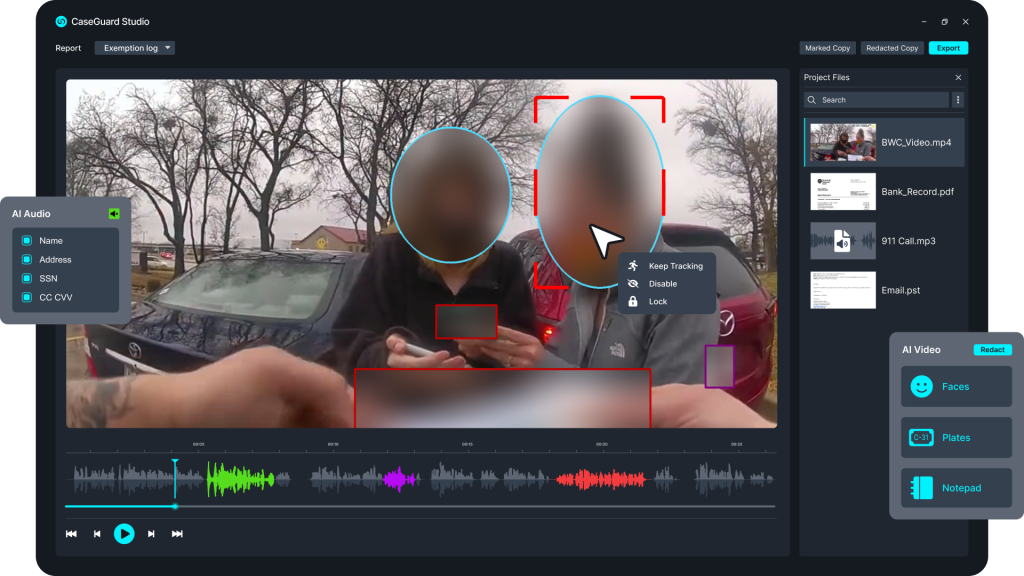
This is where the difference in design shows most clearly.
JustFOIA’s redaction suite is oriented toward documents. For video and audio, organizations typically connect external tools to finish the work. That’s a reasonable architecture, but it means hand-offs, extra steps, and more places for a file to wait in line.
CaseGuard keeps video redaction and audio redaction native. Its AI detects faces, screens, license plates, and moving objects in video with up to 90% frame accuracy. It also automatically transcribes speech to text, so reviewers can search for keywords and mute sensitive audio directly in the transcript. Instead of scrubbing a timeline listening for one name, you search for the name.
The takeaway: If your agency regularly fields requests for video and audio, native multimedia redaction removes a significant number of steps, and every removed step is one fewer place for a request to stall.
Round Three: Speed and Bulk Processing
Document redaction in a case management system typically happens file by file, with pattern-based searches to speed up repetitive work. That’s fine for a handful of documents. It’s less fine when a single request involves hundreds of files.
CaseGuard supports bulk processing. You can queue thousands of mixed-media files across multiple requests and let the AI auto-redact them simultaneously. Work that might take hours of manual effort can finish in minutes, leaving your staff to do the part only humans can: reviewing, adjusting, and applying judgment.
The takeaway: For low-volume document work, the speed difference is modest. For high-volume or mixed-media workloads, batch processing is the difference between a backlog that shrinks and one that grows.
Round Four: Team Redaction and Collaboration

JustFOIA handles collaboration at the request level. You can assign requests, set tasks, and track progress across departments. That’s what a case management system is for, and it does it well.
CaseGuard approaches collaboration at the redaction level. Inside the editing workspace, multiple team members can work in the same project. Teams can share pre-set redaction lists and exemption templates across the agency and leave timestamped notes for peer review. A supervisor can open a project, inspect the AI-detected bounding boxes, make adjustments, and approve the final export in one place.
These are different layers of collaboration. One answers “who is responsible for this request?” The other answers “who checked this redaction, and did they agree?”
The takeaway: Request-level collaboration keeps work accountable. Redaction-level collaboration keeps work accurate. Agencies with multi-person review processes will feel the difference right away.
Round Five: Compliance, Audit Trails, and Defensibility
Compliance is where redaction stops being a productivity topic and becomes a risk topic. A missed redaction can expose sensitive information, and an unexplained one can invite a challenge.
The federal framework shows why both halves matter. The U.S. Department of Justice’s Guide to the Freedom of Information Act covers the FOIA exemptions and an agency’s obligation to release the portions of a record that can reasonably be separated from exempt material. State public records laws vary, but the principle is the same: withhold what the law protects, release the rest, and be able to show your work. On the protection side, NIST’s guide to protecting the confidentiality of PII makes a simple point that applies to every redaction queue: you can’t protect personal information you haven’t identified.
JustFOIA provides dependable compliance for standard text through RegEx pattern matching and built-in exemption logs tied to its public delivery portals. For agencies whose requests are mostly documents, that’s a solid foundation.
CaseGuard extends that coverage across every medium. It generates court-defensible audit trails and exemption logs for every file format, so a redacted video gets the same documentation rigor as a redacted PDF. That consistency matters when an agency has to explain a redaction months later.
The takeaway: Both tools document their work. The question is whether your documentation needs to cover only documents, or video, audio, and images too.
So, Which One Fits Your Agency?
JustFOIA’s built-in redaction is enough only if all of these are true:
- Your requests are almost entirely clean, digital text documents
- The sensitive information follows predictable patterns, like Social Security numbers
- You rarely or never receive video, audio, images, or scanned files
- Your request volume is low enough to redact file by file
- You’re comfortable using separate tools if a media request ever arrives
CaseGuard Studio is a strong fit if:
- Your requests involve video, audio, or scanned materials
- You process large volumes and need batch redaction
- Your team would benefit from collaborative review inside the redaction workspace
- You need consistent audit trails across every file type
- Your backlog is growing faster than your headcount
1What about using both? If you already run your request lifecycle in a case management system, CaseGuard doesn’t ask you to replace it. It handles the redaction, so your case management tool can keep handling the intake and tracking.
Can you use both? Quite possibly. An agency can manage its request lifecycle in a case management system and send media-heavy files to a dedicated redaction platform. It’s a common pairing, and it lets each tool do what it was built to do.
The Bottom Line
JustFOIA is fine at managing the lifecycle of a public records request, and its redaction tools handle standard document work well. CaseGuard Studio is built for redaction across every file type, with AI detection & redaction, bulk processing, and team review in a single workspace.
The best way to compare redaction tools is to stop reading about them and start using them. Bring a few of your own files, including the awkward ones like the grainy surveillance clip and the scanned PDF, and watch how CaseGuard handles them. Book a live demo and see how much of your backlog disappears.