FERPA Redaction Involving Video and E-Mails Quickly Achieved
July 14, 2026 | 8 minutes read
- The Challenge: Fulfilling urgent public records requests involving chaotic smartphone footage and multi-page email chains while strictly maintaining compliance.
- The Solution: Utilizing automated systems to accurately handle both video and document data processing in a single, unified workspace.
- How We Achieve This: Adhering to FERPA regulations using dedicated FERPA redaction software to streamline your workflows.
- The Result: Transforming hours of tedious manual data scrubbing into a secure, verifiable ten-minute administrative task.
School administration is rarely a calm business, but nothing spikes the cortisol of a front office quite like an urgent public records request. When an incident occurs on campus, maintaining student privacy in accordance with the Family Educational Rights and Privacy Act becomes the top priority. Managing these requests manually is a notorious administrative burden, but using modern FERPA redaction software turns a complex nightmare into a streamlined process. Whether you are handling video footage or disciplinary paperwork, implementing automated redaction for education ensures total compliance without draining valuable staff hours.
A recent public records request sent to a local school district provided the perfect testing ground for a faster approach. The task required processing a chaotic three-minute smartphone video of a school incident along with an entire six-email chain containing a formal suspension notice attachment. By using CaseGuard, an all-in-one AI-powered redaction suite, the entire multi-media request was processed, cleaned, and finalized in exactly ten minutes.

Play Video
Phase Zero: Are There Federal Guidelines for Redacting Student Data Under FERPA?
The short answer? Yes. According to the United States Department of Education, schools must redact Personally Identifiable Information from education records before sharing them. This includes names, student ID’s, birthdates, and biological traits that could easily indicate which student is involved in an incident.
Every educational agency, from a local secondary school teaching secondary education to universities managing postsecondary education, must maintain strict FERPA compliance. This ensures schools do not cause a violation of the privacy rights of the student or a violation of the student in general. According to the United States Department of Education, schools must adhere to FERPA redaction standards to thoroughly remove PII from education records before sharing them.
Standard PII redaction happens in many businesses, like healthcare, finance, and legal offices. However, FERPA redaction only applies to children’s education records kept by schools and postsecondary institutions that receive federal funds. It covers direct details like names, student IDs, and birthdates. It also covers hidden clues known as “indirect identifiers.” These are things like class schedules or unique biological traits and biometric data that would let someone in the school community guess who the student is with reasonable certainty. FERPA rights belong to parents and guardians, but when kids turn 18 years of age, they become eligible students of their rights. This means control of the educational records shifts from the parents directly to them.
When a school official or school administrators review education records, they must know what counts as personal information that requires written consent versus what can be shared openly. For example, public notice allows an educational institution to release directory information to the public. This includes basic facts like the student’s name, the place of birth, and enrollment status. However, a true student’s education records contain highly sensitive materials.
To prevent an invasion of privacy and a unauthorized disclosure of information, institutional services must use secure video redaction tools to protect these fields:
- Social security numbers and health records.
- Financial records and details tied to student aid programs.
- Special education placements and files managed by a secretary of education or education agency.
- Sensitive data recorded across computer media.
Leaving these files unredacted for any third party is against the law. Only a few rare exceptions exist where data can be shared without permission, such as a formal court order, a subpoena, health and safety emergencies, or an investigation by the comptroller general of the united states.
There is also a law enforcement exception to FERPA. This means records created by a school’s internal police for law enforcement purposes are not regular school records, so they can be shared with outside police or the public without prior consent. But in cases such as today’s example where the request comes from the school itself, none of these exceptions apply. Whether a district is sharing the final results of disciplinary proceedings involving sex offenders or logging routine data over a specific time period, they must ensure their technology workflows are completely secure.
Phase One: Tackling the Chaos of Handheld Student Video
 Cellphone video loaded into CaseGuard
The first item on the docket was the phone footage. Captured by a student in the middle of a crowd, the video was shaky, fast-moving, and packed with faces. Before applying any automated tools, a quick manual scrub using the arrow keys allowed for an assessment of what private data lay hidden in the frames.
The background showed a nearby parking lot with vehicles, though a closer look confirmed no legible license plates were visible. The primary privacy concern boiled down to a sea of student faces.
Automating Redaction for Education with Artificial Intelligence
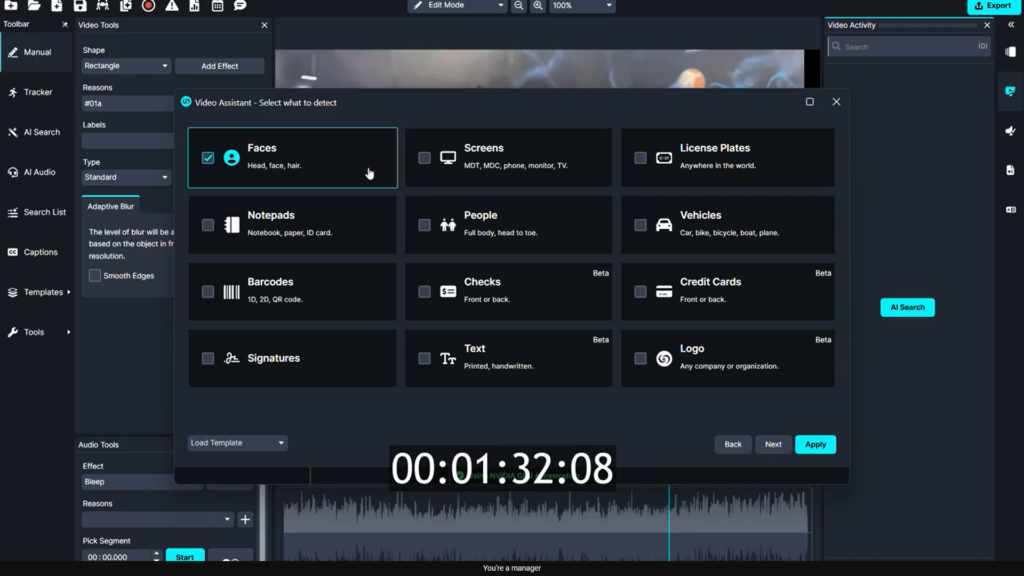 Directing the AI to find and redact students faces
Instead of drawing boxes over dozens of moving targets manually, CaseGuard features an automated search tool in its video activity panel, expediting the FERPA redaction workflow. The system is designed to instantly detect and obscure 12 distinct categories of private data, ranging from ID cards and computer screens to license plates and notepad text.
While CaseGuard is capable of obscuring the full bodies of minors, the state laws governing this specific request only required face protection. After selecting the face-only parameter, the software offered options to customize the visual style of the protective layer. CaseGuard includes over 30 different enhancement and editing effects. For this file, a standard blur was selected, a pre-set legal exemption reason was attached for the automated compliance log, and the software began processing the three-minute file.
Human Verification and Manual Tweaks
Artificial intelligence is fast, but human oversight ensures absolute accuracy. After a few minutes of processing, a quick review of the footage showed the automation handled the rolling shutter and chaotic movement remarkably well. However, one brief sequence revealed a student with highly identifiable hair whose head turned, causing the automated blur to drop for a few frames.
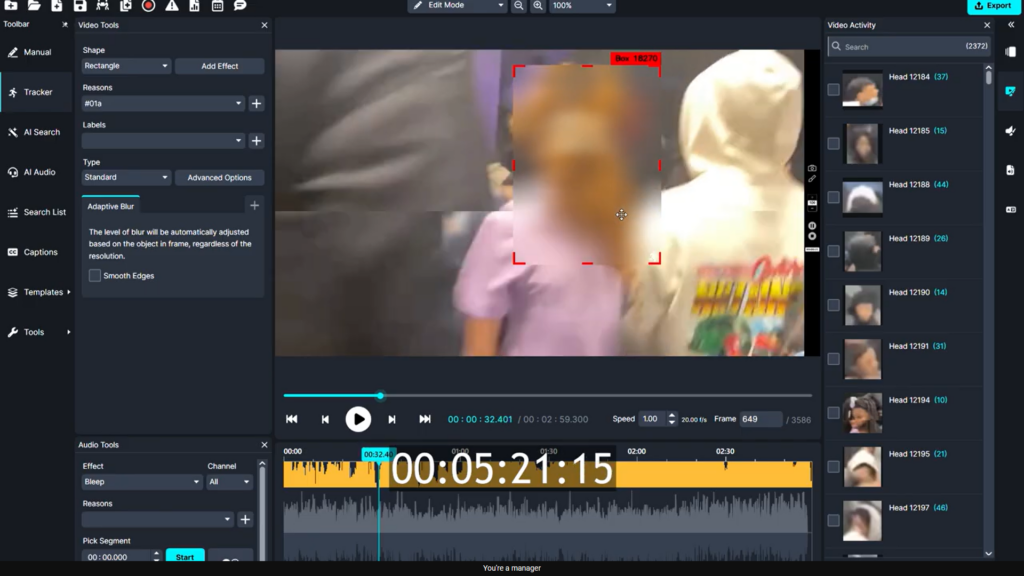 Applying a tracker to cover a students hair over a few dropped frames
Fixing these gaps is a simple process:
- Select the tracker from the left tool panel.
- Draw a quick object-tracking bounding box over the unredacted area.
- Let the software track the movement until the automated system picks the target back up.
- Right-click and delete any overlapping forward keyframes to prevent double-layering.
Unmasking the Subject of the Record
There was an important twist to this specific request. The final file was slated to become part of the official record for one specific student involved in the incident. According to administrative notes, this student appeared in a blue jacket starting around the 1:40 mark of the video. Because the file belongs to his personal file, his face needed to remain completely visible while everyone else stayed obscured.
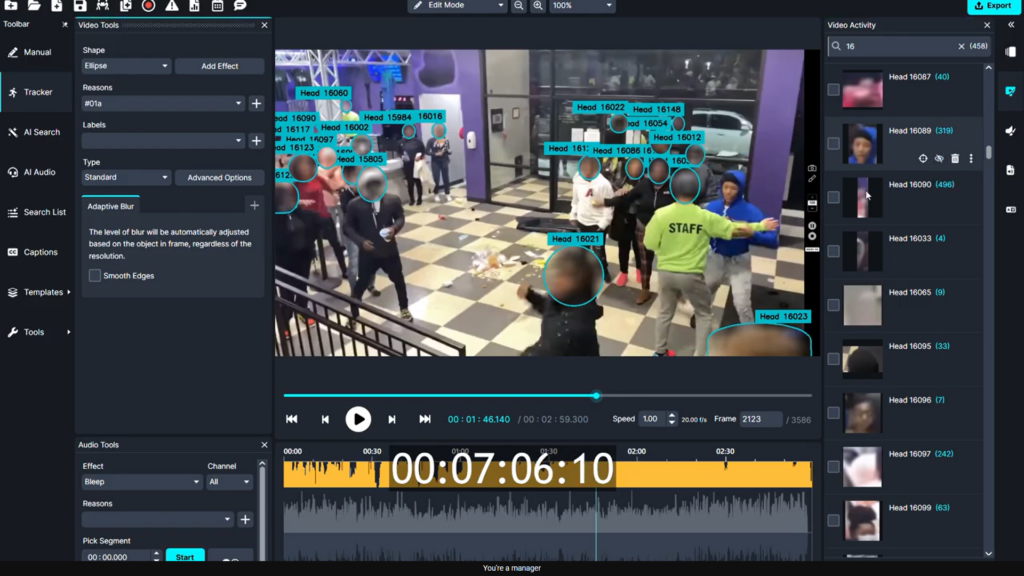 The student in the blue hoodie must be left unredacted
The software handles this without forcing the user to start from scratch. Right-clicking the blur box over the student in the blue jacket and selecting the option to disable the effect instantly cleared his face across the entire timeline. The data remains saved in the project, meaning it can be re-enabled later if the exact same video needs to be generated for a different student record down the line.
To finalize the file, the school district requested an official watermark. By drawing a box across the center of the frame, changing the asset type to an image file, and uploading the school logo, a transparent watermark was applied across the entire video file.
Phase Two: Scrubbing the Paper Trail inside the FERPA Redaction Software
With the video finished, the second half of the clock was ticking down on the documentation. The district needed to process an Outlook email database file containing six messages and a PDF suspension notice attachment.
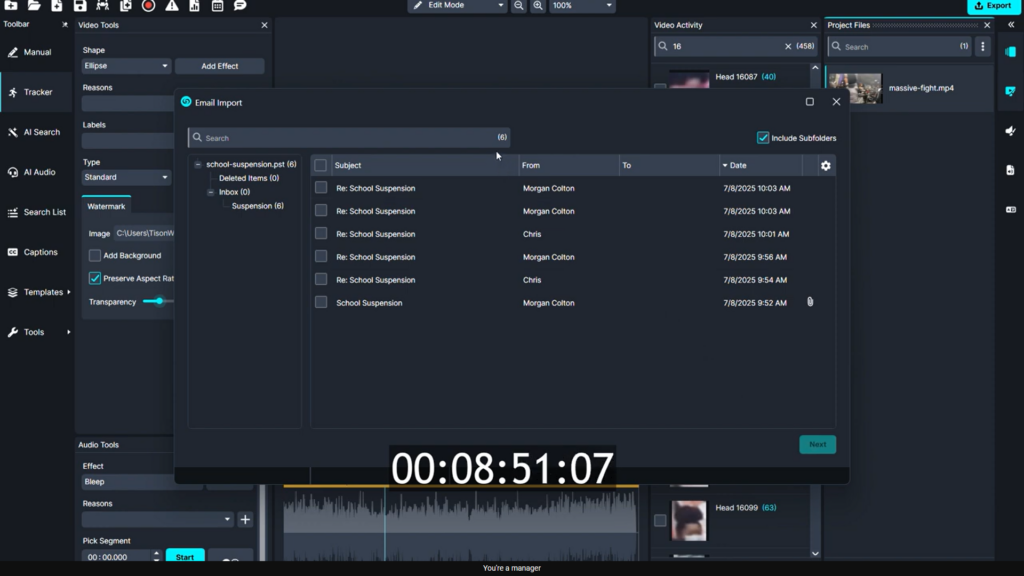 The pst file being imported into CaseGuard through the dedicated import wizard
Multi-Language Document Processing
Double-clicking the imported file opened a clear preview of the correspondence and the attached disciplinary notice. After selecting all items for processing, the PDF redaction suite opened up.
The automated search tool for documents can identify 33 distinct categories of private data across 12 different languages, including English, Spanish, French, German, and Chinese. For this file, the system was instructed to hunt for:
- Full names of students, parents, and staff
- Physical home addresses
- Email addresses
- Specific dates and times
Running the program instantly blacked out every piece of matching text across the email chain, catching individual names and contact details perfectly.
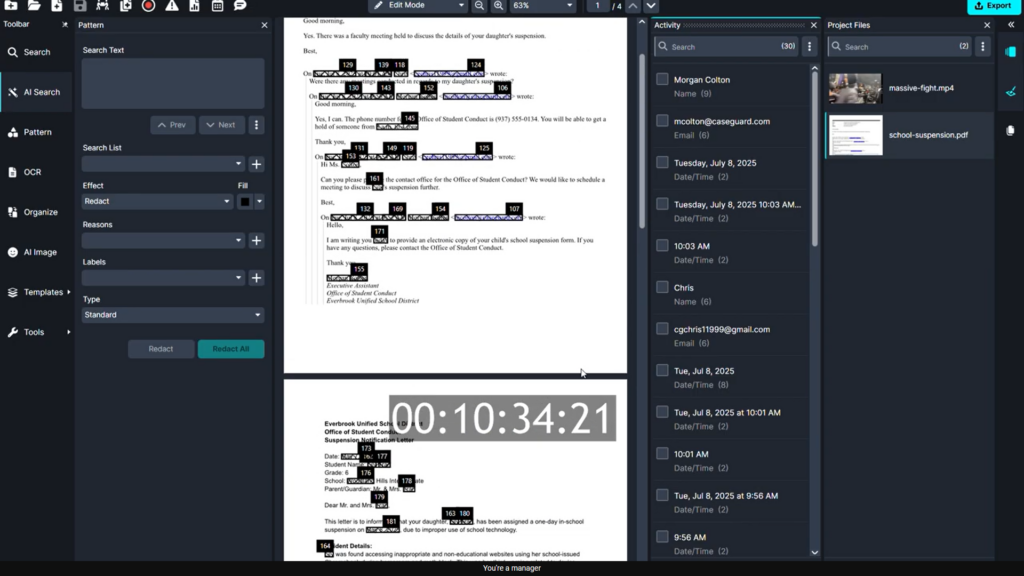 Emails plus attachments that were converted into a pdf and then marked for redaction
Maintaining Context for the Student Record
Just like the video file, the paperwork needed to display the primary student name since the document was going directly into his official file. After typing the name into the search bar, the system highlighted its locations. Selecting those instances in the activity panel and hitting disable instantly removed the black bars from his name while keeping the names of teachers, bystanders, and other administrators completely hidden.
A final stamp using the school logo image watermark was applied to all pages of the document to mark it as part of an official administrative release.
Wrapping Up the FERPA Redaction Request
With both the video and the document package completely scrubbed and watermarked, the files were exported for secure delivery to the requester. Managing public records requests in an educational setting usually feels like a race against an impossible deadline, but modern automation completely changes the math.
By offloading the tedious tracking and text-matching to intelligent software, a complex multi-media request that used to devour an entire afternoon was completely wrapped up in just ten minutes. School districts can successfully protect student privacy rights without drowning their front-office staff in endless data editing.
Ready to see how automation can transform your school’s compliance workflow and give you valuable time back? Head over to CaseGuard.com to learn more about the platform or book a free personalized demo today.